
.jpg)
PROTECT YOUR DNA WITH QUANTUM TECHNOLOGY
Orgo-Life the new way to the future Advertising by AdpathwayAs a software engineer with more than seven years of experience before the coding-agent era, I never liked the idea of vibe coding. But I knew there was a clear line between it and using coding agents to generate clean, maintainable code. That line, where good software principles meet coding agents, is defined by software factories.
That’s why, three months ago, I built my own software factory, Squid, to ship all of Decoding AI’s small and medium projects with minimal human intervention. The first version was so overbuilt I stopped using it.
Meanwhile, I kept seeing people obsess over the next “_____ engineering” label, instead of focusing on actionable outcomes. Prompt engineering, then context engineering, then harness engineering. So far, so good. But in the last few weeks (July 2026 as I write this), things got off track with loop engineering and graph engineering, which already read more like marketing talk than like anything that solves real problems. Graph engineering overtheorizes how teams have built AI applications since the LangGraph era kicked off in ~2024. Don’t get me wrong. The terms aren’t wrong (Boris Cherny, who leads Claude Code at Anthropic, says, “My job is to write loops”), but we’re overexplaining intuitive things we started doing years ago.
While you’re defining what counts as a loop, you’re not thinking about the processes that actually deliver software.
The right frame is the software factory, which was one of the core themes at AI Engineer World’s Fair 2026, where Tereza Tížková (growth at Factory.ai) defined one as “the whole loop, the whole lifecycle of developing software with autonomy.”
I bet you already have an intuitive sense of what a software factory is. In this article, I want to further formalize it and map it onto the software development lifecycle (SDLC). We’ll explore how big your software factory should be, and when to stop automating before it adds more friction than value. Most importantly, I want to highlight where the human belongs in this process, and where I believe they’ll still belong even in a world where all the code is generated by AI.
So…what’s worth automating? Where does the human bring the most value? What’s worth building, and what’s worth buying?
The design of a software factory
Like a physical factory, a software factory automates software creation with minimal human input. Raw work (bug reports, feature ideas, incidents) goes in. Shipped software comes out. It needs a few highly qualified people making high-leverage decisions, and defined gates that work can’t pass through without them.
Factory.ai pitches “a self-improving system for your Software Development Life Cycle (SDLC).” Addy Osmani frames the stack as loop, harness, factory: “The loop is the atom”; a factory is “an org chart made of loops.” Warp’s CEO, Zach Lloyd, states that “software engineering will become factory engineering.”
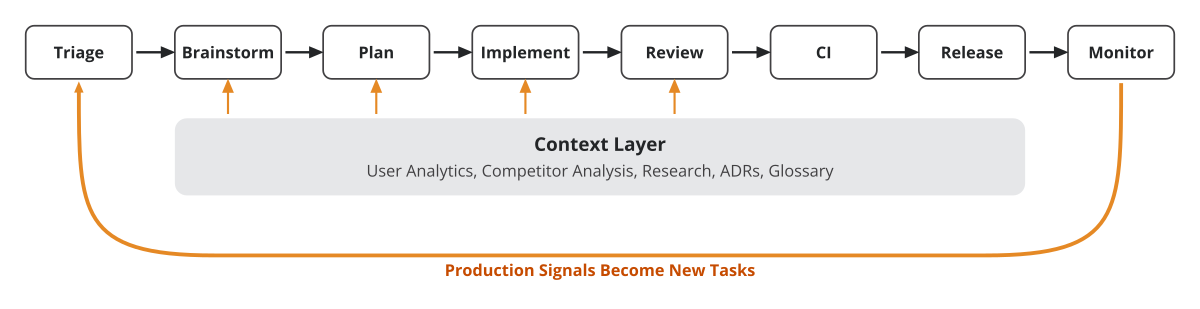 The software factory line. Eight stages over one shared context layer, with production signals looping back as new tasks.
The factory is made up of eight stages that can be divided into three buckets:
What to build. Triage/intake classifies, deduplicates, and routes incoming work. Brainstorming finds high-impact features through market analysis, user data, and technical research. Planning, the most important stage, turns that research into a polished plan, refines it by letting the agent grill you, and tracks decisions in an ADR (Architecture Decision Record) log plus a glossary. The outputs of this stage are tickets backed by documentation that a team of agents can implement, which can be tracked in plain files or a project management tool, such as GitHub Issues, Linear, or Notion.
At this stage, the agent plans in read-only mode, going through the code, the AGENTS.md file, and most importantly the context layer.
Actual building and checking. Implementing is a software engineer and QA agent loop that goes through the tasks and supporting documentation. Review checks the PR diff against product, architecture, and code standards. Review-CI runs the test suite, and failures trigger a fixing agent. Release handles CD to staging/production with human deployment checks.
Self-improving. Monitor/incident response feeds production signals (alerts, errors, incidents) back into triage as fresh input on what to build next, closing the loop.
Orthogonal to the eight stages, we have the context layer. The layer is especially important at the front of the line. Brainstorming is limited to the data it sees: user analytics, competitor analysis, research, transcripts, and documentation. At this stage, a poor context layer directly limits the space of possibilities you can explore. It has a similar impact on planning, where transforming the raw idea into technical specs and tasks depends heavily on how good the examples in the context layer are. If you want to implement a new product-recommendation feature, and you have zero examples, the LLM will just predict the most common thing to do, which often isn’t the best solution for your product.
The context layer can take many forms. One strategy that is becoming increasingly popular is the LLM Wiki, a term coined by Andrej Karpathy. It’s basically a strategy to transform your data into a structured knowledge base, just by using files, instead of a database. Factory, via its AutoWiki feature, transforms popular codebases into a structured knowledge base that agents can query instead of parsing the codebase itself. LangChain recently released OpenWiki, a CLI tool to manage wikis for agent memory. If you’re curious, in this article I detail how I turn my data from Obsidian, Readwise, and Google Drive into agent memory via LLM wikis.
Where the human belongs
To see where the human belongs, let’s walk through the factory with an end-to-end example. We’ll build a feature for a shopping-assistant agent on an ecommerce platform similar to Amazon’s. The scenario is that usage data says users aren’t engaging with its recommendations, and we have to ship an improvement.
Brainstorm is where taste lives. Agents do the grunt work: They analyze user activity, scan competitors’ assistants, and pull research into the knowledge base. Then a member of the technical staff starts looking at the data, understands why people are not engaging with the recommendations, explores how the competition implements their solution, and proposes a fix as a feature spec. At this stage, the spec solves a business problem. It doesn’t need to prescribe a technical solution yet.
Plan is where a human, with the help of the software factory, transforms the feature spec into an implementation plan. Let’s assume that we want to make a change to the recommender engine algorithm. The human chats with the knowledge base, figures out whether it’s feasible, and thinks through architecture, interfaces, data flow, cost, and latency. They then let the agent scan the codebase and grill them until the plan is properly refined into something that fits the codebase. The output is a bunch of tickets plus an ADR explaining the algorithm change and an update to the glossary.
The agent can help within these two stages by quickly scanning through a ton of data and improving the plan, but the human is still central.
Use the strongest model (Fable) for brainstorming and planning. These stages burn fewer tokens than implementation itself, but everything downstream depends on them. A well-written plan lets cheaper models (Opus, Sonnet) execute without reasoning their way out of dead ends. A weak plan makes them retry until the extra tokens erase the price gap.
With a weak plan, I’ve watched Sonnet on high reasoning out-cost Opus on the same task: The smaller model needs more attempts to reach the same goal. Total cost is tokens × price, not model tier. So more failures equals more reasoning, more tokens, and more cost.
From here on, we move into “loop” and “graph” engineering territory.
 A strong planning session makes cheap executors actually cheap, while a weak plan makes them expensive.
Implement runs a software engineer agent that picks up every ticket that’s ready to go. As the loop is scoped to a feature, it takes only the associated tickets. After each ticket is implemented, a QA agent tries to find bugs by stress-testing the application. As agents tend to have a positive bias towards their own work, the split between the software engineer and QA agents matters. As Addy Osmani puts it, the model that wrote the code is “way too nice grading its own homework.” This loop, at solo scale, can be as simple as a bunch of terminals pulling tickets. At larger scale, it runs on remote agents working 24/7.
The loop only works if agents can interact with the app. The QA agent needs one command that starts the whole stack reproducibly. From there, it drives the app in the browser, calls the data or fine-tuning pipelines, or hits your server’s API. Whatever your app’s interface is, the agent needs access to it, the same way a human user would.
The key idea is to integrate feedback loops as natively as possible into your software factory. Ideally, you want multiple levels, depending on how expensive it is to run them: linting, unit tests, integration tests, and end-to-end tests. When the loop keeps failing, the root cause is almost always missing plumbing, not the agents.
Review has three steps. Step one checks the product and architecture requirements against the ticket and the ADR. Any discrepancy becomes a new ticket passed back to the implement loop. Step two ensures code quality (modularity, naming) and guards against AI slop such as verbose comments or cryptic function names. Step three looks at the CI/CD pipeline. At every step, any failure auto-creates a task picked up by the software agent.
Not every project needs all three steps. The “factory” ends with a PR that you as a human need to review and merge. But in reality, if you spend enough time creating a strong plan, the PR that reaches you is usually ready to ship as-is.
 The dynamics between what humans and agents own in the software factory line.
So where does the human belong? You’re indispensable during brainstorming and planning, and you return for the final check. Agents own everything in between. OpenAI took this to the extreme: ~1M lines and ~1,500 merged PRs over five months with zero hand-written lines. Their framing is “Humans steer. Agents execute.”
Don’t overbuild the factory
With my first Squid version (my own software factory), I got greedy and chased full autonomy: big remote workflows, parallel agents, and one grand pipeline running end to end. It worked, until something went offscript. Which it usually does. I couldn’t debug it, couldn’t halt it mid-run, and couldn’t redirect it without throwing the run away. It was a big monolith that took me too far out of the loop, and I couldn’t control it.
I realized you need two options. The first is granular commands that let you grill your plan, implement a specific task, or review one particular step. The second, for when you’re comfortable giving the agent 24/7 autonomy, is an end-to-end command that chains all the smaller ones into a fully autonomous graph, such as one big /plan and /implement-review-all command. Basically, each step is a “loop,” while the whole pipeline is the “graph” of your software factory. Still, note how planning and the rest are split into two different commands, as planning is, and always will be, human-driven (at least if you want the result to stay aligned with what you actually want).
Bottom line. You need to be able to step in, halt it, redirect it, and interrupt it, while still having the option to go fully autonomous.
The bottleneck is me, and that’s by design. To be honest, I’ve worked mostly solo since the AI coding agent boom, and I don’t understand who the people shipping 100 features in parallel are. Most of my features (per project) build on one another, which makes them impossible to parallelize. As the project grows, you can find more and more independent features that can be implemented in parallel, but I still believe that number is limited.
That’s why, when I parallelize, I only use local agents, each running in an isolated codebase via worktrees. So far, I’ve never felt the need for 24/7 remote agents, or wanted the overhead of managing them.
A big team can justify more automation, but it has to earn it. So as with any other software product, start small, start by automating the most time-consuming bottlenecks, and add complexity gradually as people get comfortable with the system. Don’t be like me, with my Squid experiment.
Build vs. buy
In all scenarios, you’ll start with a prebuilt coding harness. The most popular vendor-locked ones are Claude Code and Codex. Or go open source with OpenCode or Pi, which took off thanks to its minimalist, extensible architecture that lets you easily build on top of it.
But picking a harness isn’t the same as knowing how to configure it and wire it into your software factory. That’s why everyone needs to know, at least intuitively, how a coding agent works under the hood: the agent loop running in your terminal, what changes when it runs remotely, how you evaluate it, and which context engineering strategies keep it cheap without making it dumber. If you want to learn more about building a coding agent from scratch, consider exploring my open source course on GitHub. Even if you never plan to build your own harness, that intuition is what lets you become a power user.
For a small team, you’ll get extremely far just by defining a set of skills and agents that encode your process on top of the coding harness (a.k.a. your software factory). To keep it simple, this is what I did with Squid, which I use to implement all my projects.
There are other off-the-shelf “software factories” powered just by skills and agents defined in .md files, such as Matt Pocock’s skills repository or the BMad method.
But remember that the factory is mostly about processes, not tools: A factory that doesn’t fit how your team already works adds friction, never gets adopted, and ends up useless.
You cross the buy line the moment engineers you don’t personally supervise run agents. Observability, tracing, cost tracking, and pay-per-token billing stop being optional and become someone’s full-time job. Agent swarms wired into Linear, Slack, and CI across distributed infrastructure are a logistical hell that isn’t your product. That’s when it makes sense to look into off-the-shelf solutions such as Factory.ai (that comes with the Droid agent), or Warp’s Oz. In Warp CEO Zach Lloyd’s words, “Most of the factory is not necessarily a new interface. It is an integration into people’s existing workflows.”
At the other end of the spectrum, you cross back to building when the platform’s constraints cost more than the team it would take to replace it, as OpenAI’s report on its Codex-built product shows.
The smallest builds, the middle buys, and the largest builds again.
What’s next
Someone is already coining next quarter’s “_____ engineering” term as we speak. But the software engineering processes you use to output real code won’t change that often. That’s why you should be open-minded but at the same time focus on actionable outcomes, not on overthinking how to label things.
As Zach Lloyd suggests: Find one “annoying part of your job” and build the smallest loop that handles it.
The harsh reality is that software factories are just at the beginning. They’re far from perfect, and especially far from being fully “autonomous.” Usually, when someone claims they’ve cracked the software factory problem, they either haven’t tested the idea enough or are trying to sell it to you. I’m confident we’ll reach the point where almost the entire software development lifecycle is automated (with the exception of brainstorming and planning), but at the moment we’re still figuring things out.
But here’s what I’m wondering:
Which stage of your factory still needs you the most? I keep automating mine, and the bottleneck stubbornly stays at planning.
Explore next
- Osmani, A. (2025). “Loop Engineering.” X.
https://x.com/addyosmani/status/2064127981161959567 - MacManus, R. (2026). “AIEWF Daily Dispatch: Loops, Software Factories & Forward Deployed Engineers.” Latent Space.
https://www.latent.space/p/aiewf-daily-dispatch-loops - Factory.ai. (n.d.). Agent-Native Software Development Platform. https://factory.ai
- Osmani, A. (2025). “Software Factories, Light and Dark.” X.
https://x.com/addyosmani/status/2079442194449232227 - Karpathy, A. (n.d.). LLM-Wiki. GitHub.
https://gist.github.com/karpathy/442a6bf555914893e9891c11519de94f - Abboud, M. (n.d.). “How Coding Agents Actually Work: Inside OpenCode.”
https://cefboud.com/posts/coding-agents-internals-opencode-deepdive/ - Kapoor, S. (n.d.). “Building and Evaluating AI Agents.” AI Engineer.
https://youtube.com/watch?v=d5EltXhbcfA - OpenAI. (n.d.). “Harness Engineering: Leveraging Codex in an Agent-First World.”
https://openai.com/index/harness-engineering/ - Parsons, C. (n.d.). “Ralph Loops: Build Dumb AI Loops That Ship.” AI Engineer.
https://www.youtube.com/watch?v=2TLXsxkz0zI - Pocock, M. (n.d.). “Software Fundamentals Matter More Than Ever.” AI Engineer.
https://www.youtube.com/watch?v=v4F1gFy-hqg - MacManus, R. (2026). “Warp CEO Zach Lloyd on Why Software Factories Are the Next Phase of Coding.” Latent Space.
https://www.latent.space/p/software-factories - Iusztin, P. (2026). “Building a Coding Agent From Scratch: Harness Architecture.” Decoding AI.
https://www.decodingai.com/p/building-a-coding-agent-from-scratch-system-design - Iusztin, P. (2026). Building a Coding Agent from Scratch Course. GitHub.
https://github.com/decodingai-magazine/building-a-coding-agent-from-scratch-course - Iusztin, P., & Bouchard, L.-F. (2026). “LLM Wikis as Living Memory for AI Agents.” Decoding AI.
https://www.decodingai.com/p/llm-wiki-agent-memory
Join 44,000+ engineers eager to learn how to build their own software factories by subscribing to Decoding AI Magazine!










 English (US) ·